
Samsung Browser
Samsung Electronics Co., Ltd.Communication
3.6189.37K Reviews
- Version
- Varies With Device
- Installs
- 1.00B
- Age Rating
- Everyone
Screenshots
Our Review of Samsung Browser
 Analysis by Appyee
I often open a browser to answer a small question, check a message link, or look something up before getting back to the person I’m talking to. That makes the browser part of my communication rhythm, even though it isn’t a messaging app: a cluttered page or a distracting ad can interrupt the exchange, while a quick search can help me respond with more clarity. Samsung Browser is worth considering if you want a mobile browser that lets you adjust that experience rather than simply accept a bare-bones default.
A browser for the in-between moments
Samsung Electronics Co., Ltd. makes this free browser, which sits in the communication category and is rated for everyone. It has been available since August 24, 2015, and its reach is substantial: it has over a billion installs and an average rating of 3.6 from around 5.9 million ratings. Those figures suggest a widely used option, but they are not a substitute for deciding whether its particular mix of controls suits you.
For me, its strongest everyday role is handling the little transitions around a conversation. If a family member sends a recipe, I can open it, skim the ingredients, and return to the chat without turning that moment into a longer browsing session. If a colleague shares an article, I can check the source and then reply with a more useful answer. A browser cannot make communication thoughtful by itself, but the way it presents pages can either help me stay on task or pull me away.
Keeping a conversation moving
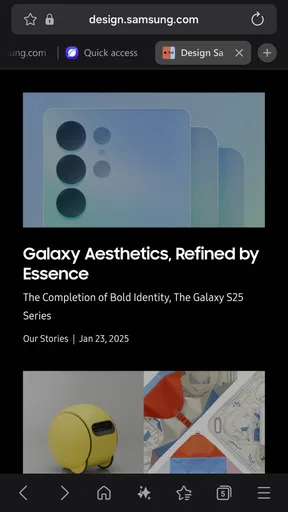
The interface feels approachable rather than crowded. I can get to a page without first sorting through a wall of controls, which matters when I’m opening a link while someone is waiting for a response. The overall experience feels quick in my use, including with several tabs open, so it works well for ordinary tasks such as comparing information or keeping a reference page nearby while I write a message.
Its integration with Samsung services can make routine steps smoother for people already using them. Samsung Pass can autofill logins, which is convenient when a link leads to a site where I need to sign in. I would still pause before saving or entering sensitive information on an unfamiliar page; convenience is useful, but it should not replace checking that a page is the one I intended to open.
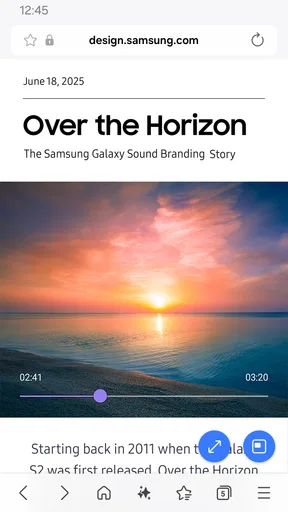
Video Assistant is another feature that changes how I use a shared link. Its video controls include a pop-out player and playback-speed options, so I can keep a video visible while doing something else or speed through material when that makes sense. That is handy for a how-to clip sent in a group chat, although multitasking is not always a win: if I need to understand the details, giving the video my full attention is better than trying to reply at the same time.
Attention, privacy, and practical limits
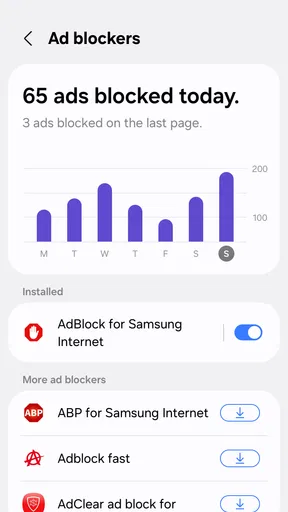
The built-in ad blocker can reduce interruptions on pages crowded with advertising, and Secret Mode gives me a separate way to browse without retaining the browsing history, cookies, or temporary files described for that mode. Biometric protection is available for Secret Mode, a useful boundary if other people sometimes use my device. I see these as practical controls, not a promise that every online activity becomes invisible or private in every respect.
A useful habit is to decide what a private tab is for before opening one. Secret Mode can help keep a browsing session out of the browser’s retained history, but it does not make a page trustworthy, prevent someone from seeing the screen while it is open, or erase information I choose to submit to a website. For a sensitive task, I would also close the session when finished and avoid leaving the device unlocked where others can pick it up.
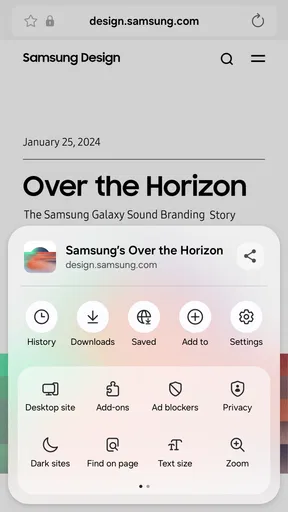
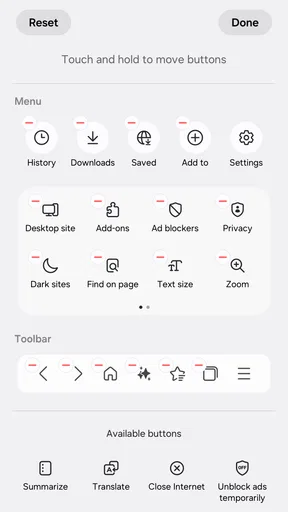
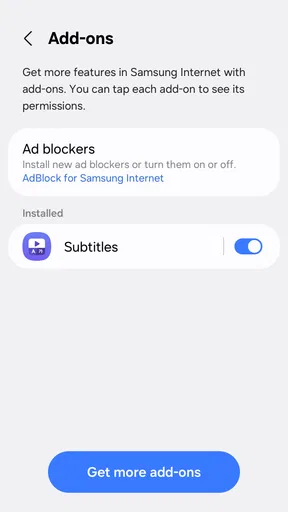
Customization is a real strength when the default layout does not fit your habits. You can change the toolbar layout, use night mode, adjust the color scheme, and install extensions. One trade-off is that tuning a browser can become its own distraction; I would change only the controls that solve a recurring annoyance, then leave the rest alone. The built-in ad blocker is helpful, but anyone expecting it to handle every unwanted element may find it less comprehensive than a dedicated third-party option.
Who will feel at home—and who may not
I would recommend trying it first if you use a Samsung phone, rely on Samsung Pass, or want more control over video playback and the browser’s appearance. It also makes sense for someone who regularly opens links from chats and wants a few tools for reducing page clutter or separating a browsing session. On a non-Samsung Android device, it can still be worth exploring, but the experience may feel less tightly connected to the services that make it especially convenient.
If your main priority is keeping browser history, bookmarks, and open tabs aligned across several kinds of devices, compare its current syncing options with the browser you already use before moving everything over. A familiar alternative may be a better fit if you depend on a particular cross-device workflow or prefer the simplest possible interface. I would also skip a switch just for the promise of privacy: no browser can make every website safe, and the ad blocker and Secret Mode address specific parts of the experience rather than every concern.
Slick Design and Smooth Performance
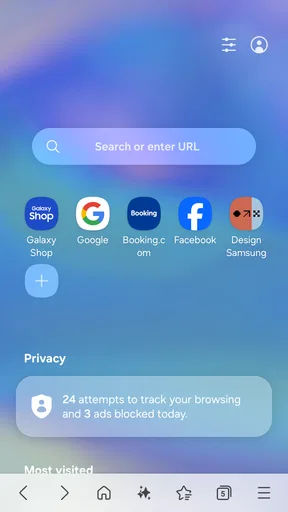
First off, let's talk about design. The Samsung Browser definitely looks sleek. It’s got a clean and minimalist interface that doesn’t overwhelm you with too many buttons or options right off the bat. The navigation feels intuitive, and everything is right where you’d expect it to be. It’s kind of like slipping into a pair of comfy shoes; you just know where everything is.
Performance-wise, it’s pretty snappy. I didn’t experience any lag or stuttering, even when I had multiple tabs open. The browser seems to handle heavy websites like a champ, and pages load quickly. It’s also optimized for Samsung devices, which might give it a bit of an edge if you're already in the Samsung ecosystem.
Privacy Features You’ll Love
Okay, here’s where it gets interesting. Samsung has put a lot of emphasis on privacy, which is something I can really get behind. It includes a built-in ad blocker, which not only makes browsing faster but also keeps those pesky ads at bay. Plus, it has a Secret Mode, which is like incognito but on steroids. It doesn't just forget your browsing history; it also doesn’t keep any cookies or temporary files. It's like you were never there. Spooky, but cool.
And for those of you who are extra cautious, you can even set up biometric protection for Secret Mode. That's right, your fingerprint or iris scan can keep your private tabs truly private. It’s a nice touch, especially if you’re sharing your device with others.
Seamless Integration and Handy Features
One of the things I really appreciated was how well the Samsung Browser integrates with other Samsung apps and services. For instance, if you use Samsung Pass, you can easily autofill passwords and logins, making the whole experience seamless. It’s little things like this that make life just a tad bit easier.
There’s also a feature called Video Assistant, which is a godsend for anyone who loves watching videos online. It gives you more control over how videos are played, with options to pop out the video player or adjust the playback speed. It’s not something you find in every browser, and it’s a fun little tool to have at your disposal.
Customization Galore
If you’re the kind of person who loves to tweak things to your liking, you’ll enjoy the customization options available. You can change the toolbar layout, enable night mode, and even customize the color scheme to match your mood or device theme. Samsung also allows you to install extensions, which is not something every mobile browser supports. It’s these little touches that make the Samsung Browser stand out.
Room for Improvement
Now, no app is perfect, and the Samsung Browser isn’t without its quirks. Sometimes, it feels a bit too tailored for Samsung devices, which might not be everyone’s cup of tea. If you’re using a different Android device, some features might not work as seamlessly. And while it’s packed with features, it might be overwhelming if you’re used to a more stripped-down browsing experience.
Another thing to consider is that while the ad blocker is great, it’s not as comprehensive as some third-party options. But hey, it’s still better than nothing, and it definitely improves the browsing experience.
My social verdict
What I like most is that this browser can support a calmer pace: I can open a link, find what I need, and return to a conversation without as many page-level distractions. It does not replace a good messaging app or solve the harder part of communication, which is knowing when to stop scrolling and answer the person in front of me. I get the best results when I treat its privacy and customization tools as practical aids, not as reasons to keep browsing longer.
Overall, the Samsung Browser is a solid choice, especially if you’re already a fan of the Samsung ecosystem. It’s fast, customizable, and packed with privacy features that make it a worthy contender in the browser wars. Give it a try, and who knows, you might just find your new favorite way to surf the web.
How Samsung Browser Compares
Full ComparisonChoose Chrome for cross-device syncing, Samsung Browser for ad blocking and Samsung integration, or Brave for privacy-focused browsing.
| App | Developer | Rating | Price |
|---|---|---|---|
 Google Chrome | Google LLC | 4.1 | Free |
 Samsung BrowserThis App | Samsung Electronics Co., Ltd. | 3.6 | Free |
 Brave Private Web Browser, VPN | Brave Software | 4.8 | Free |
Verdict
Strengths of Samsung Browser
- Fast and smooth browsing experience.
- Excellent ad-blocking features.
- Seamless integration with Samsung devices.
- Supports extensions for added functionality.
- User-friendly interface with easy navigation.
Limitations of Samsung Browser
- Limited availability on non-Samsung devices.
- Some features exclusive to Samsung models.
- Occasional compatibility issues with sites.
- Lacks some popular browser extensions.
- Updates may vary by region or device.
Other Releases by Samsung Electronics Co., Ltd.
View All
Samsung Calendar
Productivity4.1

Samsung Music
Music & Audio3.8

SmartThings
Lifestyle4.6

Samsung Email
Productivity4.4
Similar Picks in This Category
View All
Google Messages
Google LLC4.6

Gmail
Google LLC4.1

Google Meet
Google LLC4.4

Google Chrome
Google LLC4.1

WhatsApp Messenger
WhatsApp LLC4.6

Carrier Services
Google LLC4.2
You May Also Like
View All
Frequently Asked Questions
What are the key features of Samsung Browser?
Samsung Browser offers a range of features designed to enhance your browsing experience. Key features include a built-in ad blocker, night mode for comfortable reading in low light, and support for extensions. Additionally, it integrates seamlessly with Samsung's ecosystem, providing quick access to Samsung services and a clean, user-friendly interface.
Is Samsung Browser secure to use?
Yes, Samsung Browser is considered secure. It includes advanced privacy features such as Smart Anti-Tracking, which prevents websites from tracking your browsing activity. It also supports HTTPS for secure connections and provides regular updates to patch security vulnerabilities, ensuring your data remains protected.
Can I customize the Samsung Browser interface?
Samsung Browser offers several customization options to tailor the experience to your liking. You can change the toolbar layout, switch between light and dark themes, and adjust the font size for readability. Users can also install third-party extensions to add functionality, making it a versatile choice for personalization.
How does Samsung Browser perform compared to other browsers?
Samsung Browser is known for its speed and efficiency, often outperforming other browsers on Samsung devices due to its optimization for the hardware. It provides fast page loading times and a smooth browsing experience. However, performance can vary depending on your device and network conditions.
Is Samsung Browser available on non-Samsung devices?
Yes, Samsung Browser is available for download on non-Samsung Android devices via the Google Play Store. While it is optimized for Samsung devices, users of other Android phones can also take advantage of its features. However, some Samsung-specific integrations may not be available on non-Samsung hardware.
